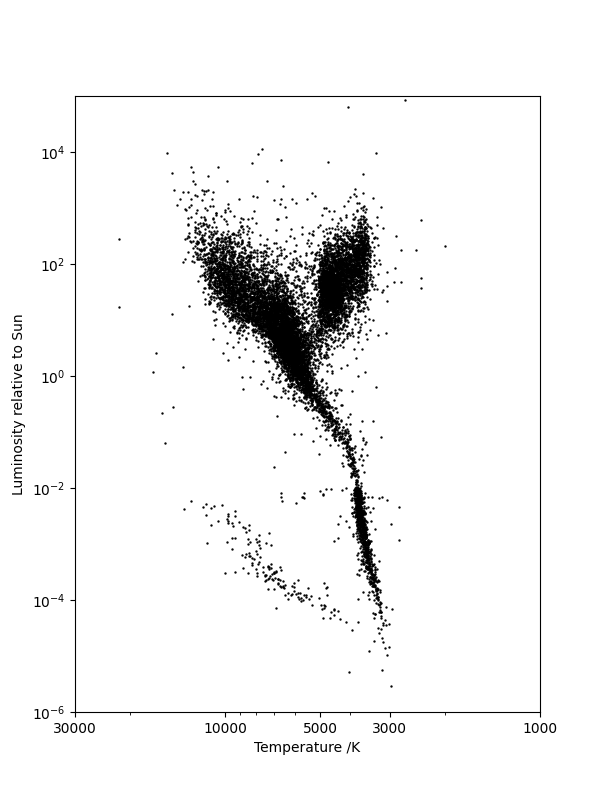
P9.2.3The Hertzsprung–Russell diagram
The Hertzsprung–Russell diagram classifies stars on a scatter plot: each star is represented as a point with an \(x\)-coordinate of effective temperature and a \(y\)-coordinate of luminosity, a measure of the star's radiated electromagnetic power.
The compressed file hygdata_v3-abridged.csv.gz represents a version of the HYG-database, released under a Creative Commons Attribution-ShareAlike license} which provides data on 119614 stars.
Read in these data with pandas and plot a Hertzsprung--Russell diagram. The luminosity column is identified as 'lum' in the header and the star temperature can be calculated from its color index (also referred to as \((B-V)\) and identified as the column labeled 'ci') using the Ballesteros formula:
Note that the luminosity is best visualized on a logarithmic scale and the temperature axis is usually plotted in reverse (decreasing temperature towards the right-hand side of the diagram).
Show solution
Here is one solution:
import pandas as pd
import matplotlib.pyplot as plt
from matplotlib.ticker import ScalarFormatter

# Read in data and calculate stellar temperature from the Ballesteros formula.
df = pd.read_csv("hygdata_v3-abridged.csv")
df["T"] = 4600 * (1 / (0.92 * df["ci"] + 1.7) + 1 / (0.92 * df["ci"] + 0.62))

# Set the aspect ratio for maximum clarity.
fig, ax = plt.subplots(figsize=(6, 8))
# Log-log plot with suitable ticks and labels.
ax.scatter(df["T"], df["lum"], s=0.5, c="k")
ax.set_yscale("log")
ax.set_xscale("log")
ax.set_ylim(1.0e-6, 1.0e5)
ax.set_xlim(30000, 1000)
ax.set_xticks([30000, 10000, 5000, 3000, 1000])
# The chosen xticks don't get used unless we explicitly set a ScalarFormatter.
ax.get_xaxis().set_major_formatter(ScalarFormatter())
ax.set_xlabel("Temperature /K")
ax.set_ylabel("Luminosity relative to Sun")

plt.show()