
P7.7.2Animation of the diffusion equation
Update Example E7.24 to display an animation of the evolution of temperature of the metal plate over time.
Show solution
Here is one approach (set the inner radius to 0 to use a circle instead of a ring).
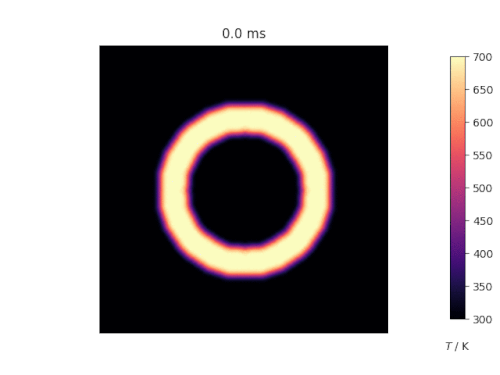
diffusion2danimation
import numpy as np
import matplotlib.pyplot as plt
import matplotlib.animation as animation

# plate size, mm
w = h = 10.0
# intervals in x-, y- directions, mm
dx = dy = 0.1
# Thermal diffusivity of steel, mm2.s-1
D = 4.0

Tcool, Thot = 300, 700

nx, ny = int(w / dx), int(h / dy)

dx2, dy2 = dx * dx, dy * dy
dt = dx2 * dy2 / (2 * D * (dx2 + dy2))

u0 = Tcool * np.ones((nx, ny))
u = u0.copy()

# Initial conditions - ring of inner radius r, width dr centred at (cx,cy) (mm)
r, dr, cx, cy = 2, 1, 5, 5
ri2, ro2 = r**2, (r + dr) ** 2
for i in range(nx):
    for j in range(ny):
        p2 = (i * dx - cx) ** 2 + (j * dy - cy) ** 2
        if ri2 < p2 < ro2:
            u0[i, j] = Thot


def do_timestep(u0, u):
    # Propagate with forward-difference in time, central-difference in space
    u[1:-1, 1:-1] = u0[1:-1, 1:-1] + D * dt * (
        (u0[2:, 1:-1] - 2 * u0[1:-1, 1:-1] + u0[:-2, 1:-1]) / dx2
        + (u0[1:-1, 2:] - 2 * u0[1:-1, 1:-1] + u0[1:-1, :-2]) / dy2
    )

    u0 = u.copy()
    return u0, u


# Number of timesteps
nsteps = 500
fig = plt.figure()
ax = fig.add_subplot()
# The initial image: interpolate for smoothness and use a perceptually uniform
# sequential colourmap.
im = ax.imshow(
    u0,
    cmap=plt.get_cmap("magma"),
    vmin=Tcool,
    vmax=Thot,
    interpolation="bicubic",
)
ax.set_axis_off()
ax.set_title("0.0 ms")
# Add in the colourbar on the right.
fig.subplots_adjust(right=0.85)
cbar_ax = fig.add_axes([0.9, 0.15, 0.03, 0.7])
cbar_ax.set_xlabel("$T$ / K", labelpad=20)
fig.colorbar(im, cax=cbar_ax)


def animate(i):
    """Advance the simulation and animation by one time step."""
    global u0, u
    u0, u = do_timestep(u0, u)
    ax.set_title(f"{i * dt * 1000:.1f} ms")
    im.set_data(u.copy())


interval = 10
ani = animation.FuncAnimation(
    fig, animate, frames=nsteps, repeat=False, interval=interval
)
plt.show()