
In the notation of this previous post, a logistic regression binary classification model takes an input feature vector, \(\boldsymbol{x}\), and returns a probability, \(\hat{y}\), that \(\boldsymbol{x}\) belongs to a particular class: \(\hat{y} = P(y=1|\boldsymbol{x})\). The model is trained on a set of provided example feature vectors, \(\boldsymbol{x}^{(i)}\), and their classifications, \(y^{(i)} = 0\) or \(1\), by finding the set of parameters that minimize the difference between \(\hat{y}^{(i)}\) and \(y^{(i)}\) in some sense.
These model parameters are the components of a vector, \(\boldsymbol{w}\) and a constant, \(b\), which relate a given input feature vector to the predicted logit or log-odds, \(z\), associated with \(\boldsymbol{x}\) belonging to the class \(y=1\) through
In this formulation,
Note that the relation between \(z\) and the components of the feature vector, \(x_j\), is linear. In particular, for a two-dimensional problem,
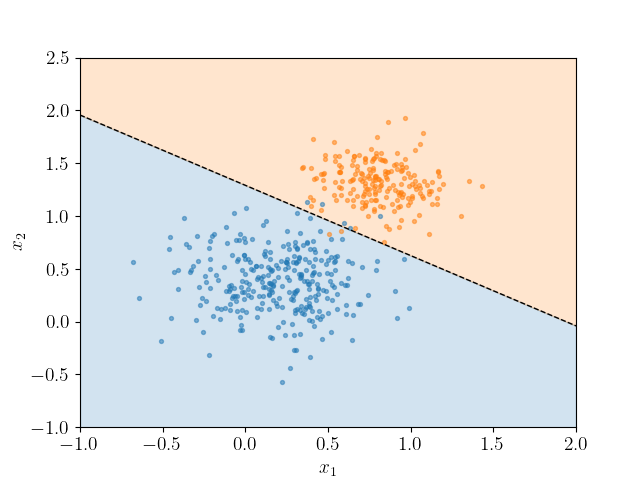
It is sometimes useful to be able to visualize the boundary line dividing the input space in which points are classified as belonging to the class of interest, \(y=1\), from that space in which points do not. This could be achieved by calculating the prediction associated with \(\hat{y}\) for a mesh of \((x_1, x_2)\) points and plotting a contour plot (see e.g. this scikit-learn example).
Alternatively, one can think of the decision boundary as the line \(x_2 = mx_1 + c\), being defined by points for which \(\hat{y}=0.5\) and hence \(z=0\). For \(x_1 = 0\) we have \(x_2=c\) (the intercept) and
For the gradient, \(m\), consider two distinct points on the decision boundary, \((x_1^a,x_2^a)\) and \((x_1^b,x_2^b)\), so that \(m = (x_2^b-x_2^a)/(x_1^b-x_1^a)\). Along the boundary line,
To see this in action, consider the data in linpts.txt, which maybe classified using scikit-learn's LogisticRegression classifier. The following script retrieves the decision boundary as above to generate the following visualization.
import numpy as np
import matplotlib.pyplot as plt
import sklearn.linear_model
plt.rc('text', usetex=True)

pts = np.loadtxt('linpts.txt')
X = pts[:,:2]
Y = pts[:,2].astype('int')

# Fit the data to a logistic regression model.
clf = sklearn.linear_model.LogisticRegression()
clf.fit(X, Y)

# Retrieve the model parameters.
b = clf.intercept_[0]
w1, w2 = clf.coef_.T
# Calculate the intercept and gradient of the decision boundary.
c = -b/w2
m = -w1/w2

# Plot the data and the classification with the decision boundary.
xmin, xmax = -1, 2
ymin, ymax = -1, 2.5
xd = np.array([xmin, xmax])
yd = m*xd + c
plt.plot(xd, yd, 'k', lw=1, ls='--')
plt.fill_between(xd, yd, ymin, color='tab:blue', alpha=0.2)
plt.fill_between(xd, yd, ymax, color='tab:orange', alpha=0.2)

plt.scatter(*X[Y==0].T, s=8, alpha=0.5)
plt.scatter(*X[Y==1].T, s=8, alpha=0.5)
plt.xlim(xmin, xmax)
plt.ylim(ymin, ymax)
plt.ylabel(r'$x_2$')
plt.xlabel(r'$x_1$')

plt.show()